
Introduction
One click can be enough to expose you to a phishing scam, fake login page, or malicious download. You might have clicked a link in an email, SMS, WhatsApp message, social media post, or website before realizing something was wrong.
Don't panic. Clicking a suspicious link does not automatically mean your computer or account has been compromised. The risk depends on what happened next: whether you entered a password, shared a verification code, downloaded a file, approved a login, or installed an application.
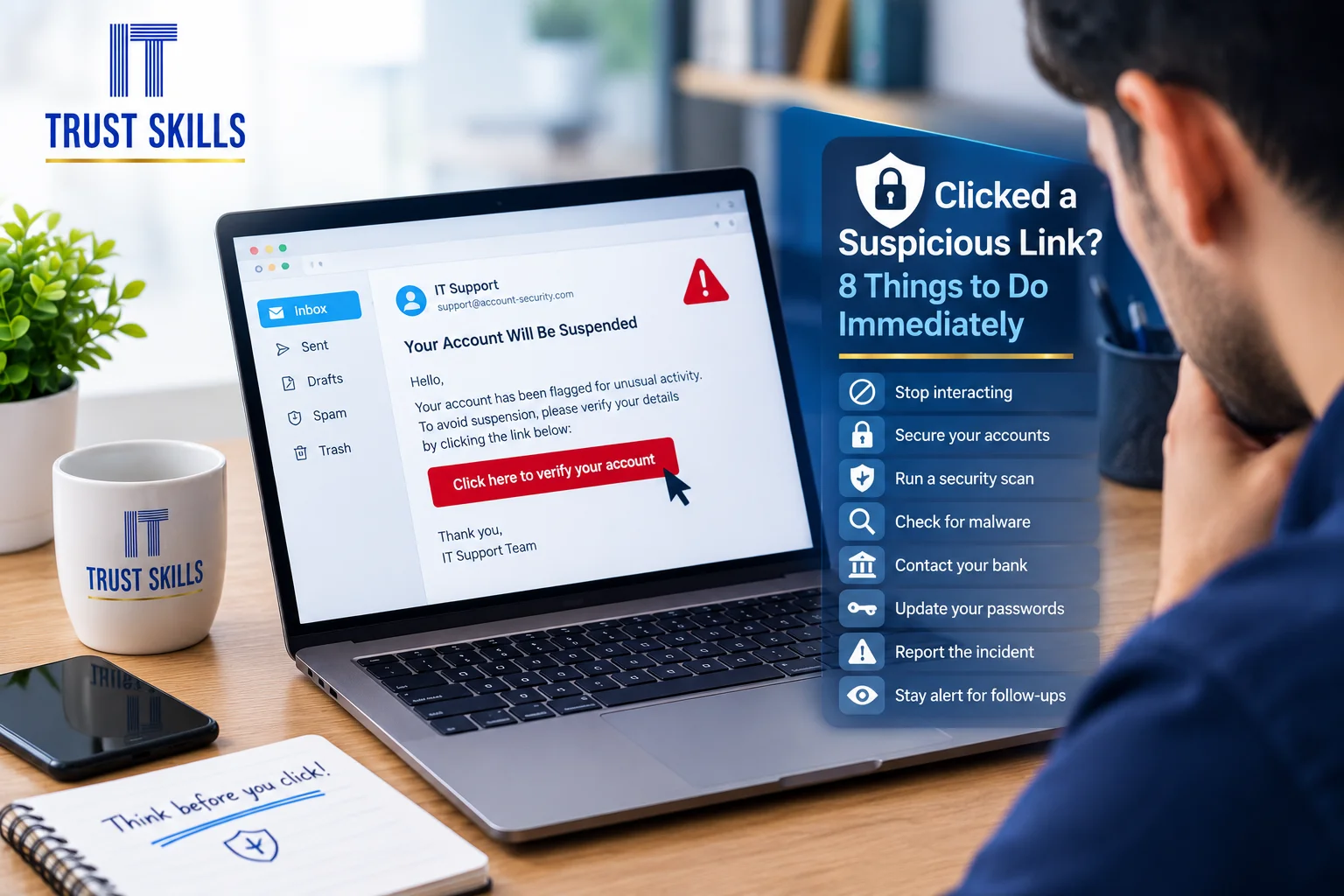
Follow these eight steps to reduce the risk and decide what to do next.
1. Stop Interacting With the Suspicious Page
Close the suspicious tab or message. Do not click additional buttons, download files, call numbers shown in the message, or follow instructions asking you to verify your account.
Be cautious if the page claims your device is infected, your account will be closed, or you must pay immediately. Scammers often use urgency and fear to pressure people into making mistakes.
2. Do Not Enter More Personal Information
If the page is asking for a password, card details, Emirates ID information, banking details, or a one-time password (OTP), do not provide them.
If you already submitted sensitive information, move quickly to the relevant protection steps below. Never share an OTP with someone who contacts you unexpectedly, even if they claim to represent a bank, delivery company, or technical support team.
3. If You Entered a Password, Change It Safely
Use a different, trusted device to open the genuine service directly, rather than returning through the suspicious link. Change the password for the affected account immediately.
If you reused that password on other accounts, change those passwords too. Start with your primary email account because it may be used to reset other passwords. Use a unique password for each important account and enable multi-factor authentication (MFA) wherever available.
Review active sessions, recent sign-ins, recovery details, and connected applications. Sign out unfamiliar sessions and remove unauthorized changes. If you cannot access the account, use the service's official account-recovery process.
4. If You Shared Banking Details or an OTP, Contact Your Bank
If you entered card details, online banking credentials, or a banking OTP, contact your bank immediately using the number on your bank card or its official app. Explain what happened and follow its instructions for blocking a card, securing online banking, or disputing unauthorized transactions.
Check recent transactions and alerts. If you notice a transaction you did not authorize, report it promptly. Do not rely on a phone number provided in the suspicious message.
5. Check Whether You Downloaded or Installed Anything
If you only opened a webpage and did not download, open, or install anything, the next steps may be different from a situation where you ran a file or installed an app. However, a webpage can still attempt to exploit browser or device vulnerabilities, so keep your browser and operating system updated.
If you downloaded a file, do not open it. If you already ran a suspicious program or installed an unfamiliar application, stop using the device for sensitive activities and seek a security check. If you suspect an active compromise or remote access, disconnect the device from Wi-Fi or the network while you arrange help.
Do not enter passwords or access your bank from a device you believe may be compromised. Use a separate, trusted device to secure your accounts.
6. Run a Security Scan
On a Windows computer, open Windows Security and check the protection status. Update security intelligence and run a scan. If you suspect a serious infection, consider a full scan or the available offline scan option.
Keep your operating system, browser, and security software updated. Avoid downloading random “PC cleaner,” antivirus, or recovery tools promoted by pop-ups, because these can create additional risks.
A scan cannot guarantee that a device is clean in every situation. If suspicious behavior continues, professional inspection may be necessary.
7. Protect Your Email and Other Important Accounts
Email accounts are especially important because they can be used to reset passwords for other services. Review your sign-in activity, recovery email address, recovery phone number, forwarding rules, and any unfamiliar account settings.
Remove changes you did not make, sign out unfamiliar sessions, and enable MFA. Also check cloud storage, social media, work accounts, and shopping accounts if you used the same password or shared information on the suspicious page.
8. Report the Incident and Watch for Follow-Up Scams
Report the suspicious message through the email, messaging, or social platform where you received it. If it involved work email or a company device, notify your IT administrator promptly. Keep the message and relevant details if they may help an investigation, but do not forward malicious attachments unnecessarily.
Be alert for follow-up calls or messages claiming they can recover your money, remove a virus, or secure your account for a fee. A person who knows details about the original incident is not necessarily trustworthy.
What If You Only Clicked the Link?
If you opened the link but did not enter information, download a file, grant permissions, or install anything, the risk may be lower. Close the page, update your browser and operating system, and watch for unusual account activity or device behavior.
If a file downloaded automatically, you granted remote access, approved an authentication request, or noticed unexpected activity, treat the situation more seriously and seek appropriate security assistance.
Warning Signs Your Account or Computer May Be Compromised
- Sign-in alerts or password-reset messages you did not request.
- Messages sent from your account without your knowledge.
- Unknown applications, browser extensions, or remote-access tools.
- Changes to account recovery details or email forwarding settings.
- Unexpected financial transactions or unfamiliar account sessions.
- Security protection disabled without your action.
Any one sign can have an innocent explanation, but unexpected changes should be investigated promptly.
Cybersecurity Support for Individuals and Businesses in Dubai
If you suspect that your computer or company account has been compromised, avoid guessing or installing unverified repair tools. Trust Skills can help with computer troubleshooting and IT support to assess suspicious device behavior, review security settings, and determine the next steps.
For a suspected business email compromise, notify your organization's IT administrator immediately. If financial information or money is involved, contact the relevant bank or service provider without delay.
Contact Trust Skills to ask about computer support and cybersecurity-related troubleshooting in Dubai.
Frequently Asked Questions
Can my phone or laptop be hacked just by clicking a link?
It is possible in some circumstances, but clicking a link does not automatically mean a device is compromised. The risk depends on the site, device security, browser vulnerabilities, and whether you entered details or downloaded or installed anything.
What should I do if I entered my password on a fake website?
From a trusted device, change the affected password, change any reused passwords, enable MFA, and review active sessions and account recovery settings. If the password was for banking, contact your bank as well.
Should I reset my computer after clicking a suspicious link?
Not usually as a first step. Start by assessing what happened and securing affected accounts. If you ran a suspicious program or signs of compromise remain, get professional advice before deciding whether a reset or reinstall is necessary.
What if I shared an OTP?
Contact the service or bank involved immediately using its official contact channel. Secure your account, review recent activity, and report any unauthorized action.
How can I avoid phishing links in the future?
Verify unexpected requests through a separate, trusted channel. Check the sender and domain carefully, avoid urgent links asking for credentials or payments, use MFA, keep software updated, and never share verification codes with unexpected callers or messages.